Your nonprofit's website is your most important digital asset. Here's how to make sure the right people can find it.
Before applying these fixes, it helps to see how different nonprofits are already using title tags in real search results. Some organizations clearly explain their mission and include relevant keywords, while others miss the opportunity by using generic labels like “Home.” The examples below show what works, what needs improvement, and how a stronger title tag can help a nonprofit make a better first impression in search
TL;DR
Organic search still drives roughly 44% of all nonprofit website traffic (M+R Benchmarks 2026). On-page SEO is the cheapest, fastest way to close that gap and bring more donors, volunteers, and supporters to your site.
Most NGOs lose visitors at the on-page layer, not the funnel. Vague title tags, missing alt text, broken header hierarchies, and slow-loading pages cost you clicks, accessibility compliance, and Google Ad Grants eligibility all at once.
On-page SEO and web accessibility are the same workstream. WCAG 2.1 requirements for headings, alt text, semantic HTML, and mobile usability map directly onto Google's ranking signals. One set of fixes solves two problems.
Why On-Page SEO Is the Highest-ROI Fix for Nonprofit Websites
Your nonprofit does extraordinary work. But if your website doesn't show up when someone searches "how to donate to education programs" or "clean water charity near me," that work stays invisible to the people who want to support it.
Here's the reality. Organic search accounts for approximately 44% of all nonprofit website traffic. That makes it the single largest free traffic channel for most NGOs. Yet the same study notes that organic search share is declining month over month as Google's AI Overviews and chatbot-driven queries intercept clicks before they reach your site.
The response to that decline isn't to abandon SEO. It's to get your on-page fundamentals right so you hold onto every click you can earn.
The opportunity is enormous because most nonprofits haven't touched this lever yet. Only 37% of nonprofits actively implement an SEO strategy, according to Nonprofit Tech for Good. That means the majority of NGOs are competing for donor attention with vague title tags, missing meta descriptions, broken heading structures, and images with no alt text.
On-page SEO is the part of search optimization you control entirely. You don't need backlinks from major publications. You don't need a developer on retainer. You need to fix the words, structure, and metadata on the pages you already have.
This checklist shows you how, step by step, with real examples from nonprofit websites you'll recognize.
[IMAGE PLACEHOLDER 1: Infographic titled "The 10-Point On-Page SEO Checklist for Nonprofit Websites" showing all 10 steps as a visual summary with icons]
The On-Page SEO Checklist: 10 Steps for Nonprofit Websites
1. Write Title Tags That Earn the Click
The title tag is the clickable blue headline in Google's search results. It's the single highest-leverage on-page SEO element you control, and most nonprofits get it wrong.
How wrong? A Q1 2025 study published in Search Engine Land found that Google rewrites title tags on 76% of pages. When your title is vague or too long, Google replaces it with whatever it thinks fits better. You lose control of your first impression.
What a strong nonprofit title tag looks like:
Keep it between 50 and 60 characters. Lead with your primary keyword. End with your organization name after a pipe or dash.
Here's how real nonprofit homepages handle it:
The Doctors Without Borders example is the most common nonprofit mistake: treating the homepage title as a brand billboard rather than a keyword opportunity. "Home" tells Google nothing about what the page offers. A stronger version: "Medical Aid Where It's Needed Most | Doctors Without Borders."
The rules:
Every page needs a unique title tag. Google's own documentation warns against "repeated or boilerplate text" in title elements.
Never use "Home," "Donate," or "About Us" as your full title. These are what Google calls "vague descriptors."
For donation pages, add an emotional hook: "Help Bring Clean Water to 1 Million People" outperforms "Our Water Programs" every time.
For blog posts, front-load the keyword: "Google Ad Grants for Nonprofits: How to Apply" beats "How Your NGO Can Apply for the Google Ad Grants Program in 2026."
D4NP insight: According to D4NP's State of Nonprofits Digitization Report 2025, over 83% of India's top 100 nonprofits score low on digital maturity. Title tags are often the first visible symptom of that gap. If your title tag says "Home" or just your organization's name, you're part of that 83%.
2. Craft Meta Descriptions as Donor-Facing Ad Copy
Meta descriptions are not a direct ranking factor. Google has confirmed this repeatedly. But they directly influence your click-through rate (CTR), and CTR is a signal Google pays attention to.
Think of your meta description as free ad copy. You get 140 to 160 characters to convince a searcher that your page is worth clicking.
What works:
One sentence summarizing your mission plus one clear call to action. Here's a strong real-world example:
Feeding America's homepage description reads as a mission summary with a specific statistic (200 food banks) and a direct CTA ("Learn how you can help end hunger"). That's the formula: specificity plus action.
What doesn't work:
charity: water's meta description covers the mission clearly but skips the CTA entirely. That's the difference between a passable description and one that earns the click.
The rules:
Keep it between 140 and 160 characters. Google truncates anything longer.
Write a unique description for every page. Your donation page and your volunteer page serve different intents. Their descriptions should reflect that.
Include your primary keyword naturally. Not stuffed, not forced. Just present.
End with a verb: "Learn how," "See our impact," "Join the movement," "Donate today."
3. Structure Your Headers (H1 to H3) for SEO and Accessibility
Header hierarchy is where on-page SEO and web accessibility converge most clearly. Get it right and you serve both Google's crawlers and screen reader users. Get it wrong and you fail both.
The W3C's Web Accessibility Initiative is explicit on this point: skipping heading levels can be confusing and should be avoided. That's WCAG 1.3.1, and it's also exactly what Google's crawlers use to understand your page structure.
The rules:
One H1 per page. It should describe the page's main topic in plain, keyword-rich language. Not your logo. Not your navigation. Not "Welcome to Our Website."
H2s for main sections. H3s for sub-sections. Never jump from H2 to H4. This is the most common heading mistake on nonprofit websites and a WCAG violation.
Use natural, descriptive language. Not "Programs" but "Our Education Programs in Rural Communities." Not "Donate" but "How Your Donation Provides 100 School Meals."
Headings are for structure, not styling. If you want bigger text, use CSS. Don't slap an H2 on a paragraph just to make it bold.
Example of a clean hierarchy for a nutrition program page:
H1: Mid-Day Meal Programme: Feeding 2 Million Children Daily
H2: How the PM POSHAN Partnership Works
H2: Where We Serve Children
H3: Karnataka Kitchens
H3: Gujarat Kitchens
H2: How to Support the Programme
Many older nonprofit WordPress themes wrap the site logo in an H1 tag on every page. If your theme does this, fix it immediately. Every page ends up with the same H1 (your org name), which tells Google nothing about page-specific content.
4. Clean Up Your URL Slugs
Google's John Mueller has called URL keywords a "very, very lightweight ranking factor." But URLs heavily influence click-through rates and shareability, especially when donors share links on WhatsApp, email, or social media.
A clean URL like yoursite.org/programs/education looks trustworthy. A messy URL like yoursite.org/page.php?id=4587&utm_source=email does not.
The rules:
3 to 5 words per slug. Top-ranking URLs average around 17 characters in the slug, according to SEO platform Positional (2025).
Lowercase and hyphenated. Google reads donate-school-meals as three separate words. It reads donate_school_meals as one.
No dates, no IDs, no stop words. /donate-monthly beats /the-best-way-to-donate-in-2024.
Use a logical folder structure that reflects your site's topic clusters: /programs/education/, /programs/health/, /donate/monthly/.
Never change a ranking URL without setting up a 301 redirect. Broken redirect chains kill organic traffic faster than almost any other on-page error.
Common NGO mistakes: CMS-default slugs like /page/?p=42, parameter-heavy donation URLs that look untrustworthy, and date-based blog URLs (/2023/04/15/post-title) that make evergreen content look stale.
5. Write Alt Text That Serves Donors and Screen Readers
Alt text is a WCAG 2.1 Level A requirement (Success Criterion 1.1.1) and a documented ranking signal for Google Image Search. Nonprofits, who rely heavily on impact photography, event photos, and infographics, gain disproportionately from doing this well.
Yet it's one of the most neglected elements on NGO websites. The pattern is familiar: dozens of images uploaded as IMG_4527.jpg with no alt text at all, or every donate button carrying the same generic alt="button".
The rules, based on the W3C WAI alt decision tree:
Informative images (event photos, impact images, beneficiary photos): describe what's in the image and what it conveys in context. Not "Children in a classroom" but "Students at a rural school in Bengaluru receiving hot mid-day meals through the nutrition programme."
Decorative images (background patterns, dividers, design elements): use empty alt text (alt="") so screen readers skip them entirely.
Functional images (donate button graphics, social media icons): describe the action, not the visual. alt="Donate now" not alt="red button".
Infographics and charts: include the data in the alt text or provide a nearby text alternative. If an infographic contains text that matters, that text must be accessible.
Keep it under approximately 125 characters (Harvard Digital Accessibility Services recommends this as a practical limit).
Never start with "image of" or "photo of." Screen readers already announce that the element is an image.
D4NP insight: D4NP's research found that over 50% of Indian nonprofits have slow, mobile-unfriendly websites. Missing or poor alt text is almost always part of that picture. When images load without alt text, they contribute nothing to SEO, nothing to accessibility, and nothing to the user's understanding if the image fails to load on a slow mobile connection.
6. Build an Internal Linking Structure That Converts
Internal links pass authority between your pages and signal your site's structure to search engine crawlers. For nonprofits, they also form the conversion pathway: blog post to program page to donation page.
Most NGO websites treat internal linking as an afterthought. Blog posts exist in isolation. Program pages don't link to related content. The donation page is reachable only through the main navigation.
The rules:
Every blog post should link to at least one program page and one donation page. The Nature Conservancy does this well. Its articles frequently link to related projects, donation pages, and educational resources, creating a web of connections that keeps visitors moving deeper into the site.
Use descriptive anchor text. Not "click here" or "learn more." Instead: "see how our literacy programs in Telangana are reaching 50,000 children." Descriptive anchor text benefits SEO and satisfies WCAG 2.4.4 (Link Purpose).
Build topic clusters. Create a pillar page (e.g., "Ending Childhood Hunger") supported by 8 to 15 sub-articles, all linking back to the pillar and to your donation page. This signals topical authority to Google and keeps readers engaged.
Limit your navigation menu to 5 to 7 main items. Both search engines and donors get lost in 12-item mega-menus.
Audit for broken internal links monthly. Google's Ad Grants website policy explicitly flags sites with "multiple broken links." A single broken link audit can protect both your SEO and your $10,000/month in free ad credits.
Where to start: Open your five most-visited blog posts. Add at least three internal links from each one: one to a relevant program page, one to your donation page, and one to another related blog post. This takes 30 minutes and can measurably improve both engagement and crawlability.
7. Optimize Content Page by Page
Not all pages on a nonprofit website serve the same purpose, and they shouldn't be optimized the same way. Your homepage, donation page, program pages, and blog posts each have different search intents, different audiences, and different conversion goals.
Google's E-E-A-T framework (Experience, Expertise, Authoritativeness, Trustworthiness) matters disproportionately for nonprofits. Why? Because nonprofit content frequently touches what Google calls "Your Money or Your Life" (YMYL) topics: health, finance, child welfare, disaster relief. Google applies its strictest quality standards to these topics.
Page-by-page playbook:
Homepage: Your mission statement should be visible above the fold, written in keyword-rich natural language. Include structured data for Organization or NGO. Display trust signals: Charity Navigator rating, GuideStar Seal of Transparency, registration numbers, and evaluator ratings. Your homepage H1 should describe what your organization does, not just your name.
Donation pages: Keep content short and scannable around the donation form. Add a FAQ section addressing the questions donors actually ask: "How is my donation used?", "Is my gift tax-deductible?", "Can I donate monthly?" Display trust badges near the form. M+R Benchmarks 2026 reports the average donation page conversion rate is only 12%. Every piece of friction you remove here translates directly to revenue.
Program pages: This is where E-E-A-T earns its keep. Include original data and measurable outcomes. Tell beneficiary stories with named individuals where ethically appropriate. Use photos with strong, descriptive alt text. Name program staff with their credentials. These signals tell Google (and donors) that real experts with real experience stand behind the content.
About page: Real names, real photos, board members, financials, registration numbers. This is the single highest-leverage E-E-A-T page on your entire site.
Blog posts: Aim for 1,200 to 2,500 words for pillar topics. Include an author byline with credentials. Use original photos or data. Link to your program and donation pages. Keep updated dates honest: Google's Search Quality Rater Guidelines warn against fake date refreshes.
Impact reports: If you publish annual reports as PDFs only, you're invisible to AI Overviews and answer engines. Mirror the key findings as a real HTML page on your site. PDF-only reports get indexed by Google but are nearly invisible in AI-generated search results.
8. Add Schema Markup for Search and AI Visibility
Schema markup is structured data you add to your site's code to help search engines and AI systems understand your content. It's no longer a nice-to-have. In 2025, both Google and Microsoft publicly confirmed that structured data feeds their generative AI features.
For a sector losing organic traffic to AI Overviews and chatbot responses, schema is infrastructure. It makes your site machine-readable, which is how you get cited rather than ignored.
The five schema types every nonprofit should implement (in JSON-LD format):
Organization / NGO: Your legal name, founding date, logo, URL, contact information, and registration. Use @type: "NGO" with the NonprofitType enumeration. Schema.org provides regional types: Nonprofit501c3 for US organizations, CharitableIncorporatedOrganization for UK, and equivalents for Germany, Italy, and the Netherlands.
WebSite: Enables the sitelinks search box in Google results.
BreadcrumbList: Improves crawlability and the visual display of your pages in search results.
Article: For blog posts and impact content. Include author, publisher, datePublished, and dateModified.
FAQPage: For donation FAQs, volunteer FAQs, and program FAQs. This is high-value for AI Overview appearances and Google's "People Also Ask" boxes.
Bonus: If your nonprofit runs events (fundraisers, galas, volunteer training), add Event schema with dates, locations, and ticket information.
Validate every implementation with Google's Rich Results Test and monitor results in Search Console under the Enhancements tab.
Why this matters for AI visibility specifically: AI search engines like ChatGPT, Perplexity, Gemini, and Claude don't rank pages the way Google does. Schema markup tells these systems what your organization is, what it does, and why it's authoritative.
9. Pass Core Web Vitals and Mobile-First Checks
Google uses mobile-first indexing, meaning it evaluates and ranks your site based on the mobile version. M+R Benchmarks 2026 confirms that 52% of nonprofit website visits now come from mobile devices.
But here's the nuance: while mobile drives discovery, desktop still drives donations. M+R reports that desktop accounts for 72% of donation revenue and 57% of donation transactions. Mobile donation pages convert at just 8%, compared to 11% on desktop.
What does this mean? Your mobile site needs to be fast and functional enough to bring people in. Your desktop site needs to convert them. Both need to pass Core Web Vitals.
Google's Core Web Vitals thresholds (2025):
Common NGO mobile pitfalls:
Hero videos on the homepage that destroy LCP scores
Pop-up donation overlays that won't close properly on mobile
Carousel sliders that cause layout shift every time a new slide loads
Image hero banners over 1 MB that take seconds to render on 3G connections
Donation form input fields too small to tap accurately (WCAG 2.5.5 requires a minimum 48x48 pixel touch target)
Quick wins:
Compress every image to WebP or AVIF format. A typical NGO homepage saves 60% to 80% on image file size.
Add loading="lazy" to every below-the-fold image. Never lazy-load above-the-fold images, as this hurts LCP.
Audit your plugins. Most WordPress nonprofit sites run 25 or more plugins. Cutting unused ones often drops LCP by a full second.
Add a CDN. Cloudflare's free tier is sufficient for most small and mid-sized NGOs.
Test monthly with Google PageSpeed Insights and GTmetrix.
10. Treat Accessibility as On-Page SEO
This is the point most guides miss entirely. On-page SEO and web accessibility are not two separate projects. They're one workstream with two sets of benefits.
The RKD Group's 2025 Nonprofit Website Performance Report found that 62.3% of nonprofit sites still need accessibility improvements on desktop, and 63.4% on mobile. That's despite the fact that 94% of nonprofits now have mobile-optimized sites. Mobile responsiveness is not the same as accessibility.
Where accessibility and on-page SEO requirements are identical:
[IMAGE PLACEHOLDER 2: Infographic titled "Where Accessibility and SEO Overlap" showing the table above as a visual with icons for each row]
The legal dimension matters too. In the US, the Department of Justice adopted WCAG 2.1 Level AA as the standard for government websites in April 2024, and over 4,000 ADA lawsuits related to digital properties were filed in 2024 alone (UsableNet, 2024 Year-End Report). Nonprofit donation pages function legally as e-commerce. In the EU, the European Accessibility Act took effect in June 2025 and applies to many nonprofit donation services.
The bottom line: run a WCAG 2.1 AA audit using free tools like WAVE, axe DevTools, or Accessibility Insights. Fix every critical issue. You'll improve your SEO, reduce legal risk, and make your site usable by everyone your nonprofit serves.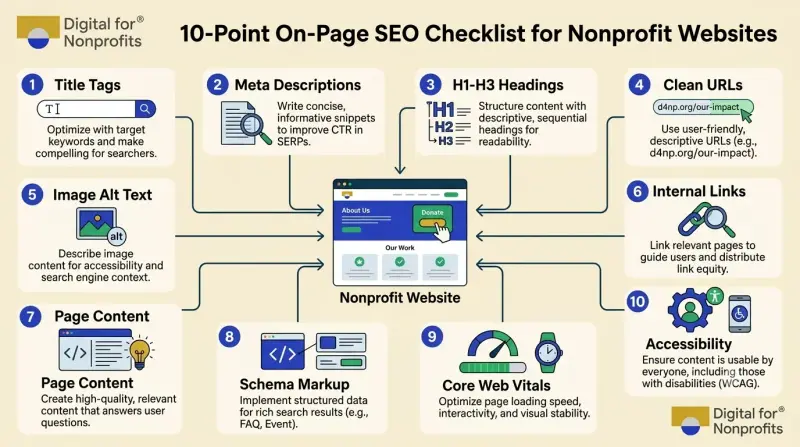
The Five Most Common On-Page SEO Mistakes Nonprofits Make
Based on data from M+R Benchmarks 2026, the RKD Group's 2025 Nonprofit Website Performance Report, and audits of real NGO sites:
Vague title tags like "Home" or "Donate" with no keywords. Fix: keyword plus brand, 50 to 60 characters.
Missing or generic alt text across the entire site. This is typically the single largest combined WCAG and SEO gap on any nonprofit website.
No internal links between blog posts and donation or program pages. This is the most expensive mistake in terms of lost revenue, because it breaks the discovery-to-conversion pathway.
No schema markup at all. This is the single biggest miss for AI and answer-engine visibility in 2026.
PDF-only impact reports and annual reports. Google indexes PDFs, but they're nearly invisible in AI Overviews. Mirror key findings as HTML pages.
On-Page SEO and Google Ad Grants: Two Birds, One Checklist
If your nonprofit uses or plans to apply forGoogle Ad Grants ($10,000 per month in free Google Ads), here's something most guides don't tell you: Google's Ad Grants website policy requires the same things on-page SEO requires.
The policy states that participating nonprofit websites must have substantial original content, a clear description of the organization's mission and activities, clear navigation, clear calls to action, no broken links, HTTPS security, and fast load times.
Those requirements are identical to on-page SEO fundamentals. Fix your title tags, clean up your headings, add alt text, audit your internal links, improve your page speed, and you've simultaneously protected your eligibility for $120,000 per year in free advertising.
This matters more than most nonprofits realize. D4NP's research found that 83% of Indian NGOs don't use free digital ad grants, forfeiting the equivalent of approximately ₹1 crore (around $120,000) annually. Many of those organizations would qualify if their websites met the baseline quality requirements. On-page SEO isn't just about organic traffic. It's about unlocking thetech grants your organization is entitled to.
A 30-60-90 Day Plan to Fix Your Nonprofit's On-Page SEO
Days 1 to 30: The Quick Wins (No Developer Needed)
Rewrite the title tag and meta description for your 10 most important pages: homepage, donation page, monthly giving page, top 3 program pages, about page, contact page, and your 2 highest-traffic blog posts.
Audit your homepage H1. Make sure it describes what your organization does, not just your name.
Add descriptive alt text to every image on those same 10 pages.
Run Google PageSpeed Insights on your donation page. Fix the top 3 issues flagged.
Add at least 3 internal links from each of your top 5 blog posts to your donation and program pages.
How you'll know it's working: Organic impressions in Google Search Console rise by 15% to 30% within 8 to 12 weeks. CTR on your top pages rises by at least 0.5 percentage points.
Days 30 to 90: The Structural Fixes
Implement Organization/NGO, WebSite, and BreadcrumbList schema sitewide. Add FAQPage schema to your donation FAQ.
Audit every URL slug. Redirect any URLs with parameters, dates, or auto-generated IDs to clean, keyword-rich slugs using 301 redirects.
Build a topic cluster structure: identify your 3 biggest cause-related keywords and create pillar pages with 5 to 8 supporting sub-articles each, all interlinked.
Run a WCAG 2.1 AA accessibility audit using free tools (WAVE, axe DevTools, Accessibility Insights). Fix every critical issue.
Compress every image on the site to WebP or AVIF. Remove unused plugins.
How you'll know it's working: Core Web Vitals status in Search Console reaches "Good" for over 75% of URLs. Your site passes a Google Ad Grants policy review without warnings.
Day 90 and Beyond: Sustain and Grow
Publish one well-optimized, E-E-A-T-rich blog post per month, tied to a program page and linked to your donation page.
Re-audit title tags, alt text, and broken internal links quarterly.
Track AI citation visibility: test how ChatGPT and Perplexity answer queries like "best [your cause] charity in [your region]" every quarter. If you're not being cited, revisit your schema and FAQ content.
Add answer-engine optimization (AEO) to every content brief. Structure content as direct answers to the questions donors actually ask, backed by named statistics and sources.
Your Website Is Your Mission's Front Door
Every nonprofit exists to create change. But change requires supporters, donors, and volunteers who can find you.
On-page SEO is not a marketing luxury. It's the difference between a supporter finding your donation page on the first search result and landing on a competitor's instead. It's the difference between an AI chatbot citing your impact data and citing someone else's. It's the difference between passing your Google Ad Grants review and losing $10,000 a month in free advertising.
The good news? Every fix in this checklist is within your control. You don't need a big budget. You don't need an agency. You need an afternoon, this checklist, and the willingness to treat your website as the mission-critical asset it is.
Start with your title tags. Fix your alt text. Add three internal links to your best blog post. Those three steps alone will put you ahead of the majority of nonprofit websites.
Your mission deserves to be found. Now make sure it can be.
Want help optimizing your nonprofit's website for search? D4NP helps qualified nonprofits activate tech grants, build digital maturity, and become self-reliant.Connect with us to start your free digital assessment.